Lookup Values
Some fields in the Maintenance API accept values that are configured per company inside ProPlant Office (the on-premise desktop application). These values are not fixed in the API specification — they can be extended or reduced by each customer. Because there is no API endpoint to query them programmatically, integrators must look them up in ProPlant Office and store them in their own system.
This page documents which fields are affected, where to find the values in ProPlant Office, and how to use them in API requests.
Language requirement: ProPlant Office must be set to English when looking up these values. If the application is configured in another language, the displayed values will be translated and will not match the values accepted or returned by the API.
Activity Kind
API field: activityKind (string)
Required in: POST /v1/plants/{plantId}/tasks
Returned in: GET /tasks, GET /jobs-planned, GET /jobs-done
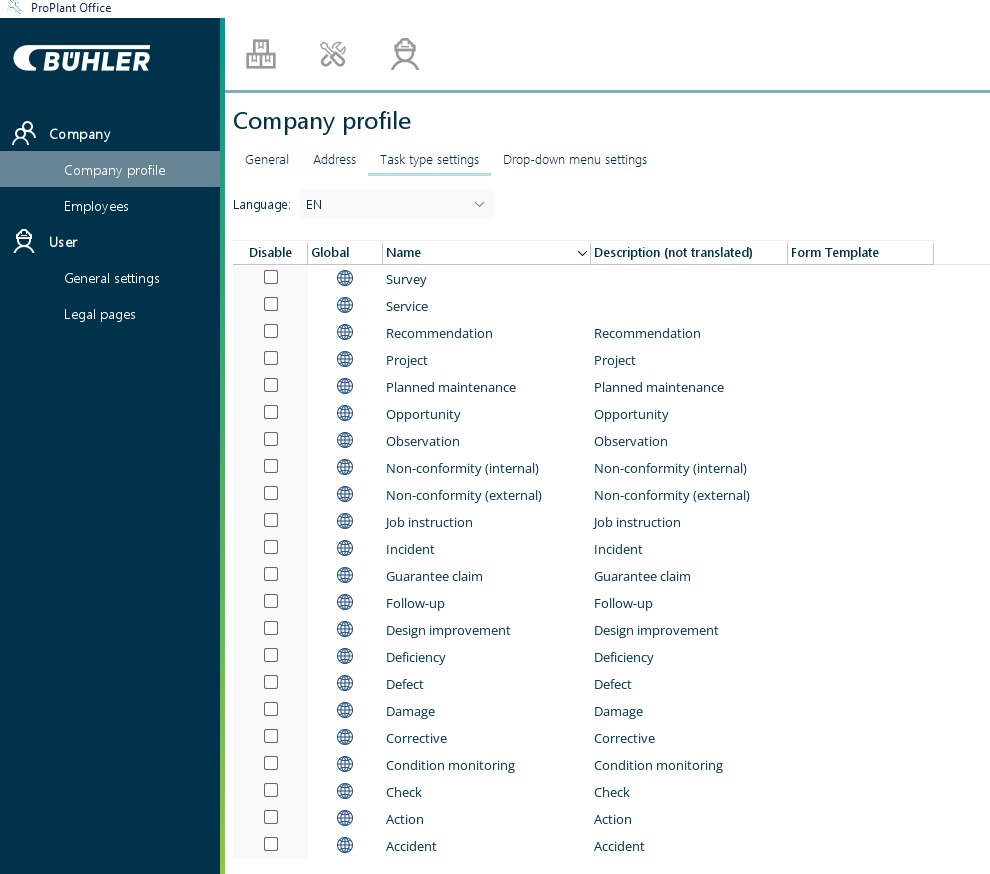
The activity kind describes the nature of the maintenance task (e.g. corrective, preventive, incident). The value sent when creating a task must exactly match one of the values configured in ProPlant Office. Otherwise, the API returns a 400 Bad Request error.
The list in ProPlant Office shows multiple columns. Use the value from the Name column in your API requests.
Where to find it in ProPlant Office:
Navigate to Settings (gear icon) → Company → Company profile → tab "Task type settings". The list shows all available activity kind values for your company.
Assigned To Role
API field: assignedToRole (string)
Required in: POST /v1/plants/{plantId}/tasks
Returned in: GET /tasks
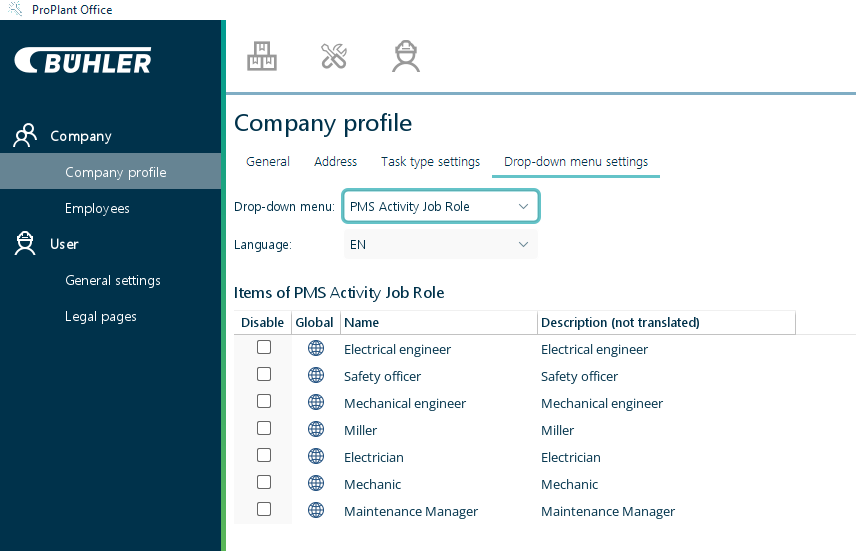
The role to which the task is assigned (e.g. a maintenance team or functional group). Roles are company-specific and managed in ProPlant Office.
The list in ProPlant Office shows multiple columns. Use the value from the Name column in your API requests.
Where to find it in ProPlant Office:
Navigate to Settings (gear icon) → Company → Company profile → tab "Drop-down menu settings". Select the list "PMS Activity Job Role" from the drop-down. The list shows all roles available in your company.
Priority
API field: priority (string)
Required in: POST /v1/plants/{plantId}/tasks
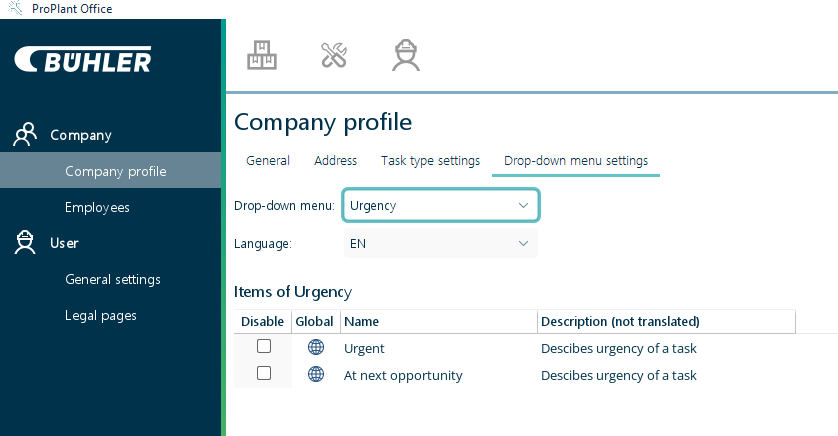
The urgency level of the task. Priority values are company-specific and must exactly match what is defined in ProPlant Office.
The list in ProPlant Office shows multiple columns. Use the value from the Name column in your API requests.
Where to find it in ProPlant Office:
Navigate to Settings (gear icon) → Company → Company profile → tab "Drop-down menu settings". Select the list "Urgency" from the drop-down. The list shows all available priority levels for your company.
Department
API field: department (string)
Returned in: GET /jobs-planned, GET /jobs-done
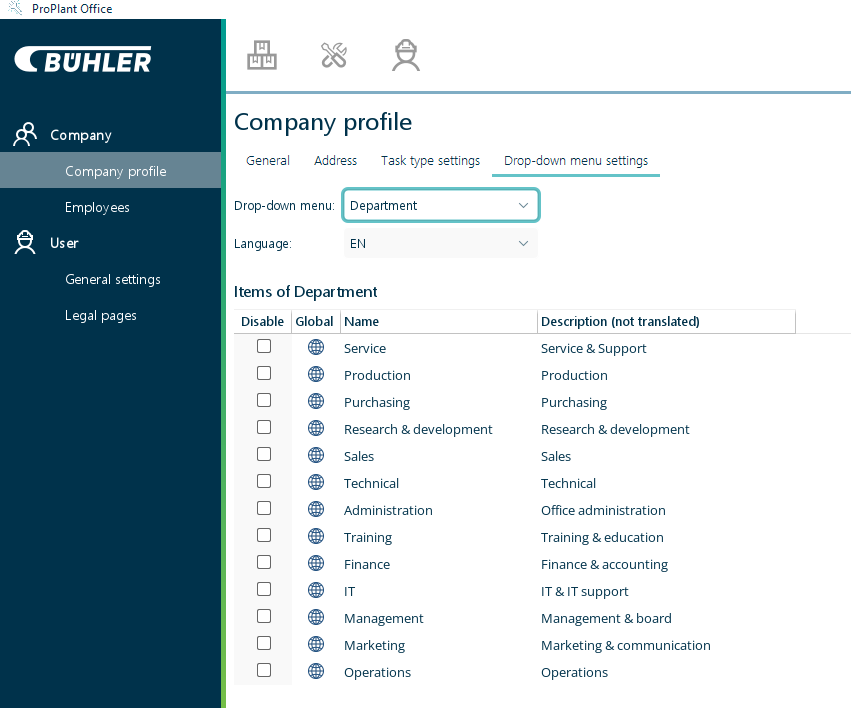
The department responsible for a planned or completed job. This is a read-only field returned in API responses. It cannot be set via the API. Knowing the configured department values in advance allows integrators to map or filter jobs by department in their own system.
The list in ProPlant Office shows multiple columns. The API returns the value from the Name column.
Where to find it in ProPlant Office:
Navigate to Settings (gear icon) → Company → Company profile → tab "Drop-down menu settings". Select the list "Department" from the drop-down. The list shows all departments configured for your company.
Inventory Unit
API field: unit (string)
Optional in: PUT /v1/plants/{plantId}/parts/{partId}/stock-level
The unit of measurement for the stock quantity being reported. Unlike the fields above, this field accepts only the following fixed values defined in the API specification. It is not configurable in ProPlant Office:
| Value |
|---|
PCS |
SET |
LTR |
M |
GR |
Part IDs
API field: id (request body)
Required in: PUT /v1/plants/{plantId}/parts/{partId}/stock-level
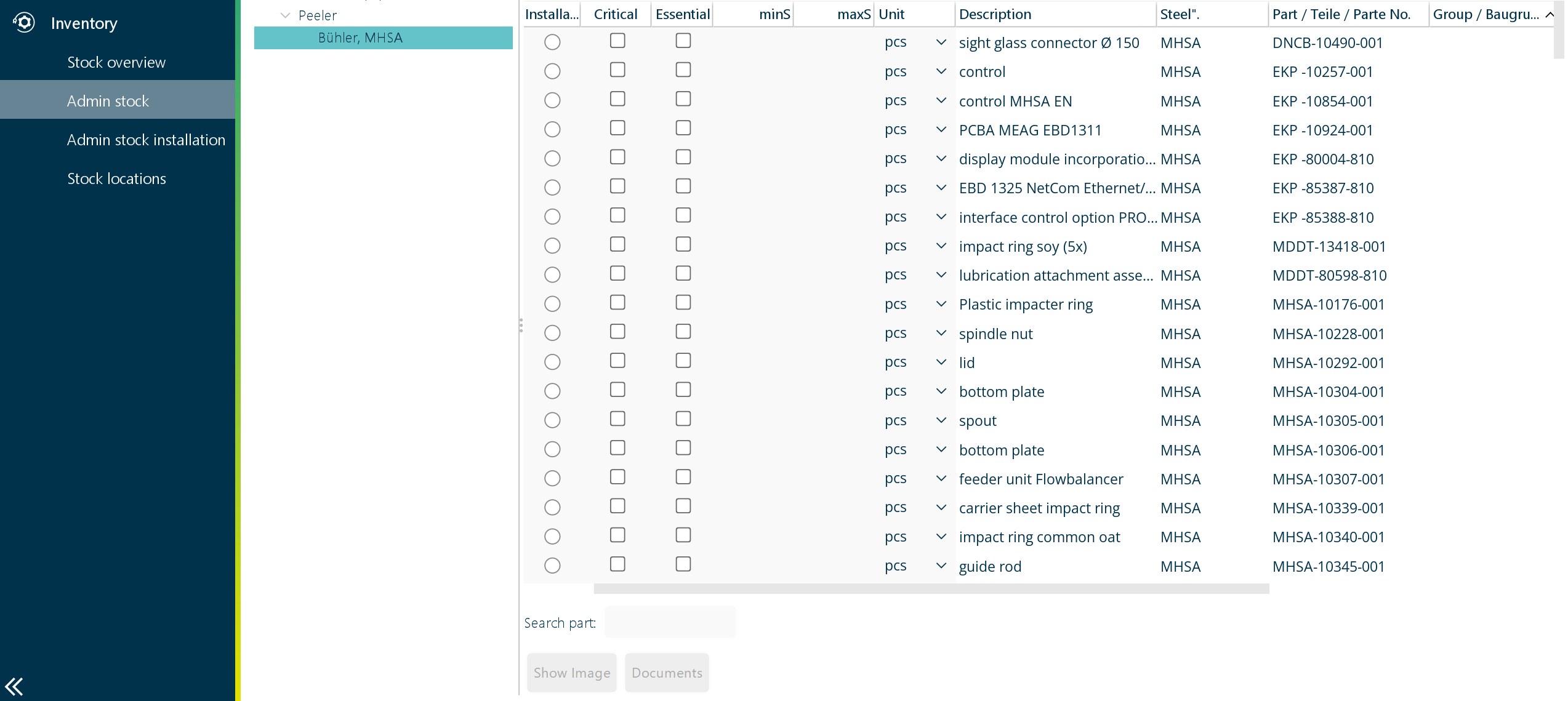
The part identifier must refer to an existing part registered in ProPlant Office. There is no API endpoint to list available parts. Integrators must retrieve the list from ProPlant Office and store the relevant IDs in their own system.
Where to find it in ProPlant Office:
Navigate to Warehouse and choose "Admin stock" for company-wide parts or "Admin stock installation" for plant-wide parts. The list shows all parts with their IDs and descriptions. The required partID value corresponds to the Part / Teile / Parte No. column in the list.
Further information
- Getting Started — examples for creating tasks and inventory records
- Errors — error responses returned when a lookup value does not match
- API Reference — complete endpoint and field documentation
{"environments":[],"pdf-download":true}